Name your desktops.
Any of them, two keys away.
14 days, every feature, no card. Then $1 a month per Mac, cancel any time.
macOS 13 or later, Apple silicon and Intel. 5.5 MB. Developer ID signed, notarised by Apple.
Say the name. You are there in about 200 milliseconds.
Two keystrokes become the habit. One shows everything, one takes you there.
The Board
- Press them together.
- Every desktop on one screen: hover to look, click to go, type a name, press a number.
- Rename, reorder, add, right there.
- Two screens? Drag a desktop onto the other Board to link the two, and one name moves both.
Say the name
- Hold them, say the desktop’s name, let go.
- Recognition runs on your Mac.
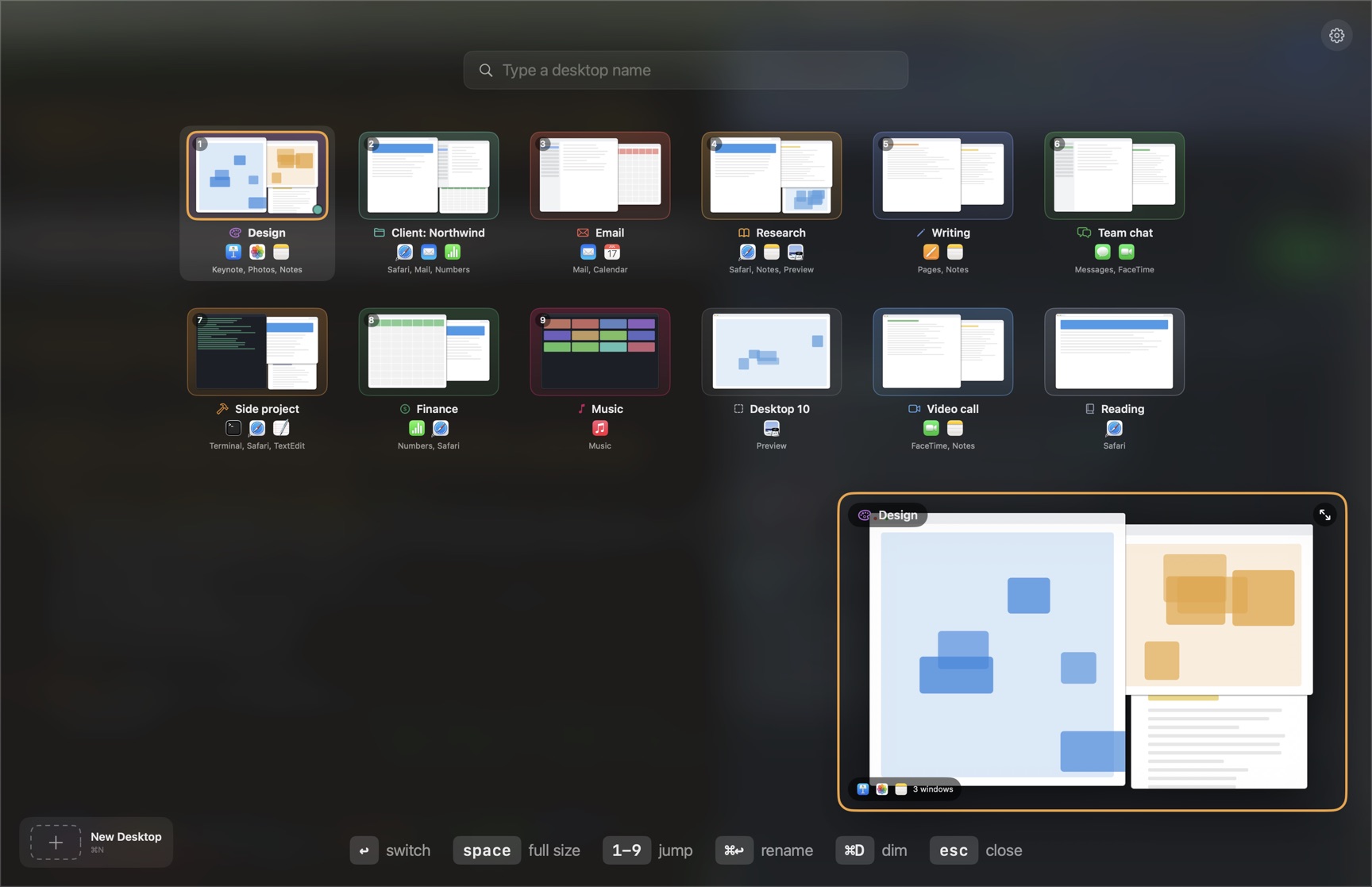
macOS numbers your desktops and leaves it there.
A number does not say what is on a desktop, so you open Mission Control and read the windows to find out. DeskSay gives each desktop a name, an icon and a colour, then puts all of them on one screen.
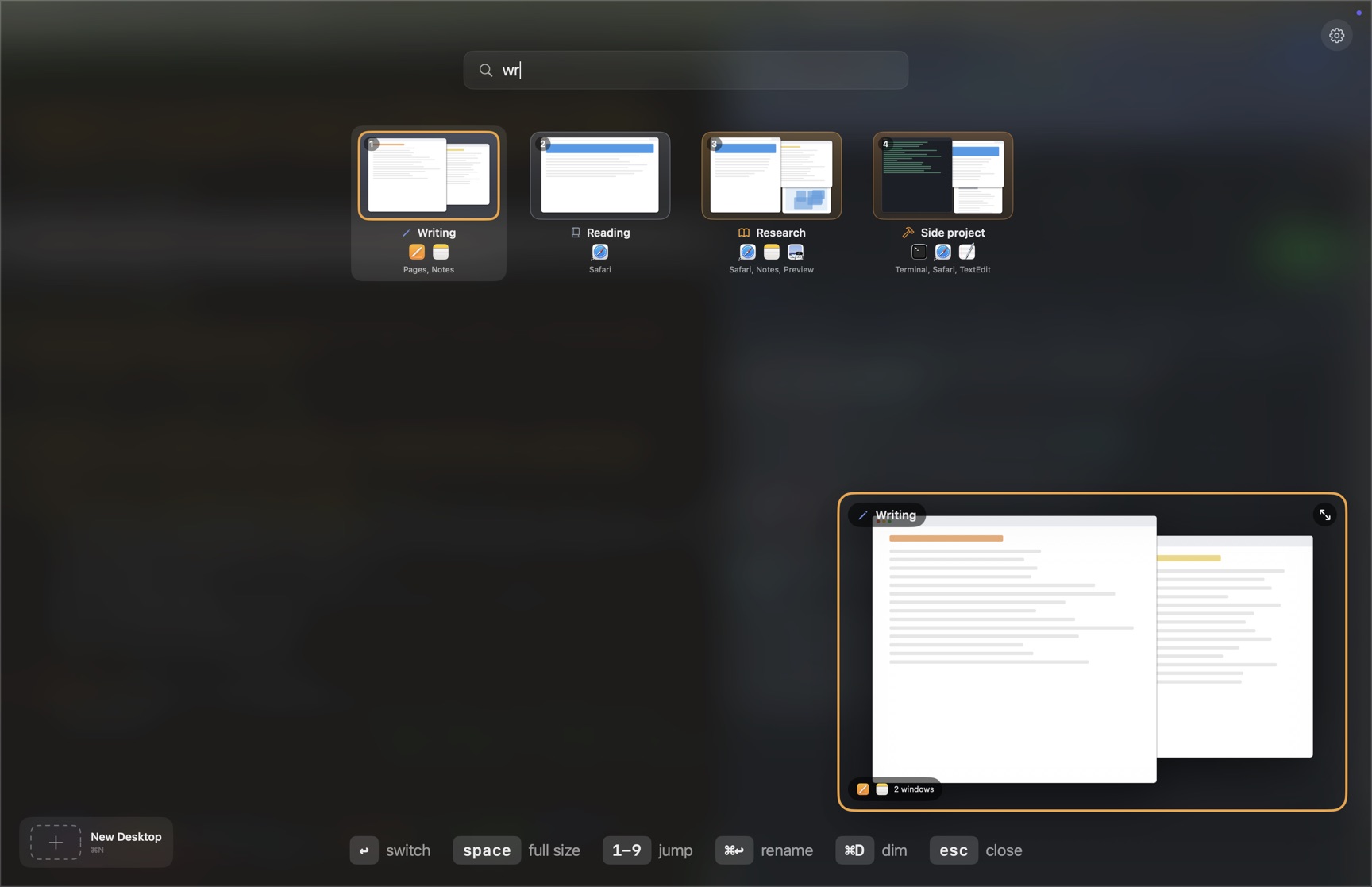
Type two letters, press a number, or say the name.
- ⌥option+1onePress them together and the Board opens. Any key you like, in Settings, Switching.
- F3The Mission Control key can open the Board too, and so can a tap of Control and Option; both are switches in Settings, Switching.
- ⌥option+spaceHold them and say the desktop’s name.
- ab ↵Type a few letters. The best match is selected; Return switches.
- 1 to 9Jump straight to a desktop.
- hoverRest on a tile for its full-size button and rename pencil. Click the tile and you are there.
- one keyGive any desktop its own shortcut and skip the Board.
- notchRest the pointer on the notch, or the top centre of another display, for a strip of desktops. Click one to switch.
- ⌥ dragHold Option while dragging a window and the Board opens as the place to drop it. Release over a desktop and the window goes there. Prefer Shift or Control? Settings, Switching.
Rename, reorder and add desktops from the Board.
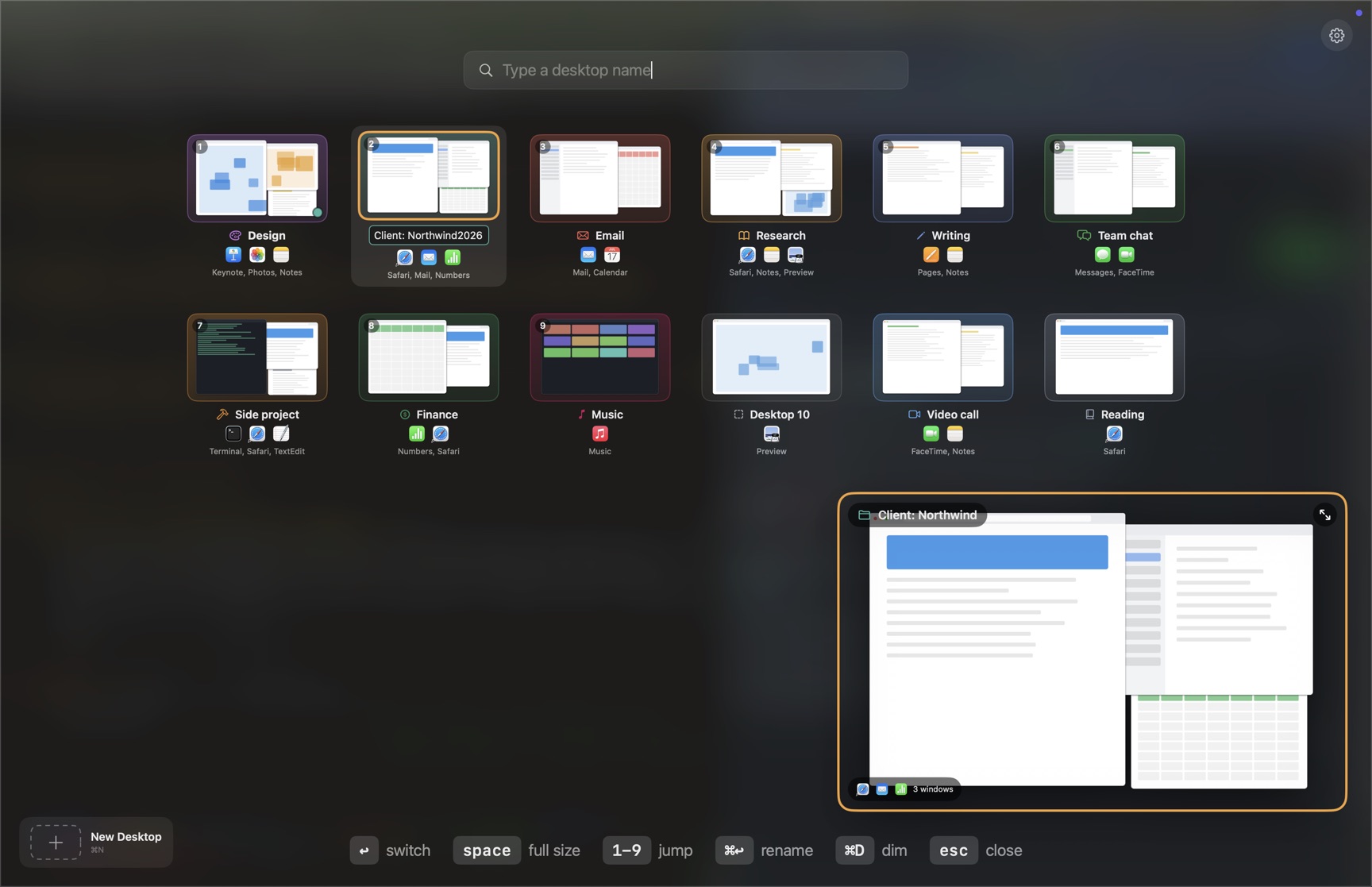
Rename where it sits
Right-click a tile, click the pencil beside its name, or press ⌘↵. Type, press Return. The icon and colour follow the new name, unless you chose them yourself.
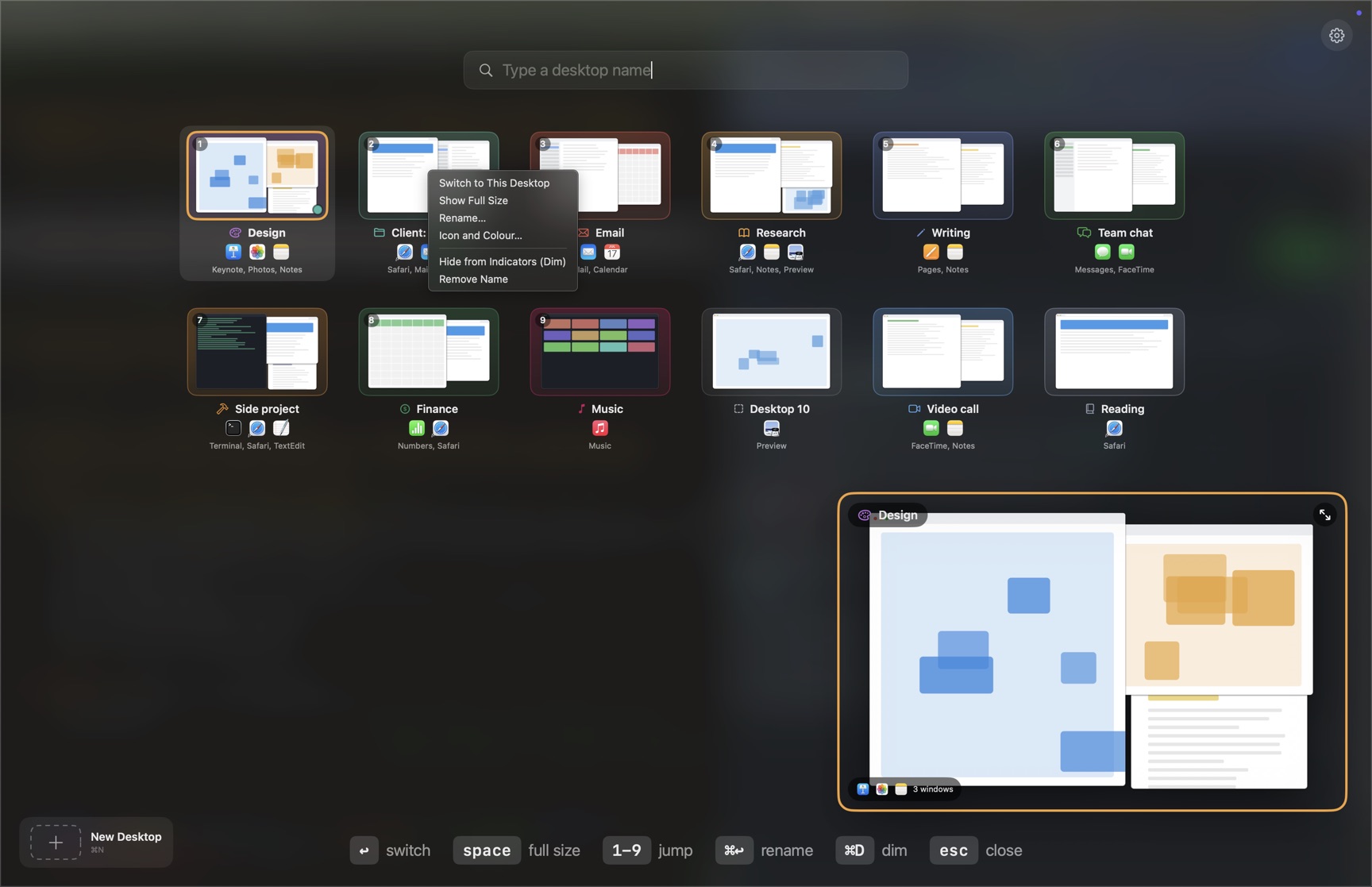
Everything on the tile
Right-click any tile for the rest: Switch to This Desktop, Show Full Size, Rename, Icon and Colour, Hide from Indicators (Dim), Remove Name. Dim keeps a desktop off the menu bar indicators and keeps its name.
Names, icons and colours also appear over Mission Control's own thumbnails, and the menu bar can show the current desktop's name and colour, so the desktop you want is the one you can read.
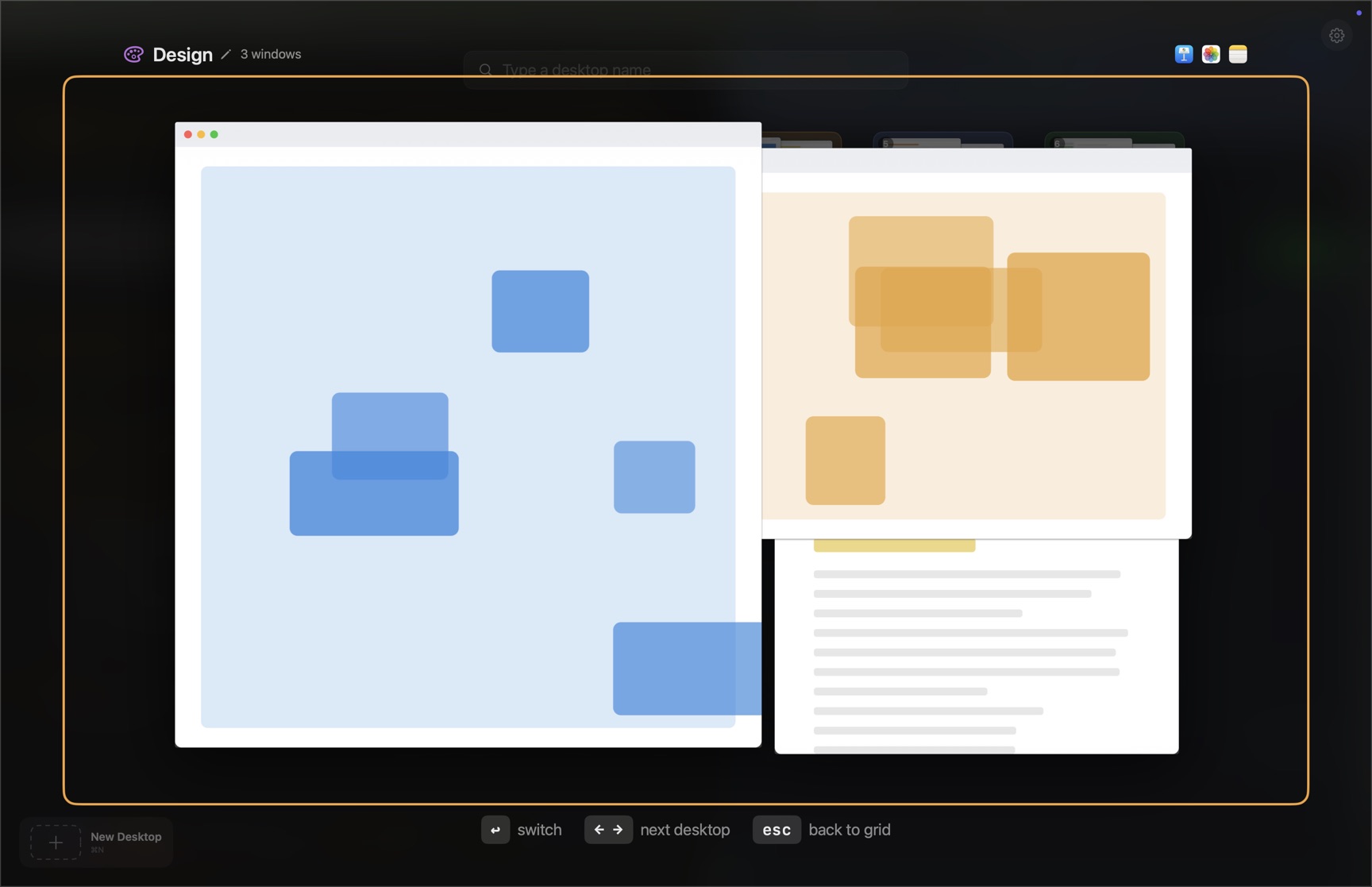
One desktop at reading size
Press space on any tile, or the corner button on a preview, and the desktop opens at reading size. Arrow keys step through desktops, Return switches, click the name to rename it there.
Time per desktop
Time per desktop and per app, with idle time kept separate. Export it as CSV when a client asks.
A note per desktop
Each desktop can hold a floating note with checklists. Dock it to the side of the screen when you want it out of sight.
Automations
Open the apps and folders a desktop needs when you arrive, and tidy up when you leave. Or run a group on demand.
About 200 milliseconds a switch. Your voice stays on the Mac.
Switching skips the macOS slide animation, so a desktop change takes about 200 milliseconds instead of about half a second with the animation. Speech recognition runs entirely on your Mac using the engine macOS already ships, so your voice never leaves the machine and no account is involved.
One dollar a month. Per Mac.
After the trial, DeskSay keeps every name, note and record. Switching continues at 30 switches a month until you subscribe.
Or $10 a year, two months free. Cancel any time.
- Every update included, installed in place
- Direct download, 5.5 MB, no App Store account
What's new
1.2.925 September 2026
Added
- Once two desktops are linked, the Board shows a Linked Displays switch beside New Desktop. Off lets each screen switch on its own and keeps the links; on brings the same links back without linking anything again.
1.2.823 September 2026
Fixed
- "New desktop called X" (from a drop on empty space, the tile menu or Settings) made a second, empty desktop when the other display already had an unlinked desktop called X, linked the empty one, and every switch to X then landed that display on the empty desktop while the real one kept the windows. It now links the existing desktop and says so; nothing is added.
Added
- A linked switch now shows one mark per display on the desktop card, on every display in the link. A display that has moved off the desktop within a second of the switch turns its mark red and the card says where it went; with the card turned off, a message says so instead.
- The log records each display of a linked switch on its own line (from, to, engine, time) and looks again one and three seconds later, so a display that drifts after the switch is named rather than lost.
Changed
- Reordering on one display's Board now reorders the other display too: a desktop linked to one you moved, or carrying the same name, takes the same position there, so "Desktop 3" is the same desktop on both screens. The other desktops keep their order in the slots left.
1.2.721 September 2026
Fixed
- With two displays, New Desktop from the Board on the second display added the desktop to the first. It now goes on the display whose Board you used.
- The name prompt for a new desktop, and the confirmations for deleting desktops, opened on the main display whatever screen the Board was on. They now open on the screen you used.
1.2.618 September 2026
Added
- Delete one desktop from its tile: hover a tile and a trash button appears at its corner, or select it and press Command Delete. Both ask first, like the right-click item.
Changed
- "Delete N Empty Desktops" now includes the desktop you are on when it is empty; it goes last. One desktop per display still always stays.
1.2.518 September 2026
Added
- Delete a desktop from the Board: right-click a tile and choose Delete Desktop. After you confirm, Mission Control removes it the way its close button would, its windows move to another desktop, and DeskSay forgets the name, notes, shortcut and automations it kept for it. Mission Control takes the screen for a few seconds while it works. A display's last desktop and fullscreen apps are not offered.
- Delete every empty desktop at once: when the Board finds desktops with no windows on them, a "Delete N Empty Desktops" button appears beside New Desktop. It lists them, asks once, and removes them one after another through Mission Control. The desktop you are on and one desktop per display always stay.
- DeskSay keeps watching for Accessibility after launch and whenever it comes to the front, so turning the permission on in System Settings takes effect without a relaunch. An update can start with the permission gone; before, only the first-ever prompt was watched.
Fixed
- Option-drag of a window sometimes opened nothing. Two causes are closed: a drag whose release DeskSay missed left it waiting for a surface that was not on screen, so the next drag went nowhere (the next press now resets it); and with Option already held, the window under the press was looked up a moment late, when macOS's drag helper window could already sit in front of it (it is looked up at the press now). A modifier drag that still opens nothing writes why to the log.
- Unplug a display and macOS moves its desktops onto the display that is still connected, in front of that display's own. The Board now shows them there, where Mission Control does, and keeps your order for the display's own desktops after them. Before, they were pushed to the end of the Board, so the Board and Mission Control disagreed, and the first drag afterwards asked Mission Control to move every one of them back.
- Linked desktops whose display is unplugged: both halves of the link are then on one display, and the Board hid one of them behind the other. Both are listed now, each under its own name, and the link comes back once the desktops are on separate displays again.
Questions
Does my voice go anywhere?
No. Recognition uses the on-device speech engine built into macOS. Nothing is uploaded, nothing is stored, and DeskSay works with the network switched off.
What does it ask for when I open it?
Accessibility, which is what makes switching instant and lets you drag a window to another desktop. Microphone and Speech Recognition, only for saying a desktop name out loud; skip them and every other way to switch still works. Screen Recording, for the window pictures on Board tiles; macOS asks once, when you turn them on in Settings, On Screen, and without it tiles show the apps on each desktop as icons.
Will macOS warn me when I open it?
No. macOS asks once whether to open an app downloaded from the internet, the same question it asks of any direct download, and that is the whole of it. The notarisation ticket is stapled to the download, so that check passes with the network off.
Does it work with more than one display?
Yes. Each display keeps its own desktops, and DeskSay names and switches them separately. The Board opens on every display at once, each one showing its own desktops with its own tile size, and the keyboard follows your pointer between them. Say a name and the desktop with that name switches, on whichever display it lives; with the same name on two displays, the one under your pointer wins.
Why is it not on the Mac App Store?
Reading and changing desktops needs access the App Store sandbox does not permit, so DeskSay is sold directly from this site, signed and notarised like any direct download can be, and updated in place from 1.2.2 on.
What happens when the trial ends?
Nothing is deleted. Names, notes, automations and time records stay, and you keep 30 switches a month until you subscribe.
How do I cancel?
From the app, Settings, Licence, Manage subscription, or at desksay.com/manage. Stripe's portal cancels it, and you keep unlimited switching until the end of the period you paid for. After that, DeskSay behaves as it does after the trial.
Why a subscription and not a one-off price?
DeskSay leans on parts of macOS that Apple changes every year, and keeping it working across those changes is ongoing work. A dollar a month per Mac pays for that work as it happens, instead of a bigger price that has to guess at it in advance.
I have more than one Mac
Choose the number at checkout; each is a dollar a month. One licence key activates on that many Macs, and you can add or remove Macs later at desksay.com/manage.
Do I need a microphone?
No. Voice is one way to switch. The Board, per-desktop shortcuts, the notch strip and window dragging all work without a microphone, and without granting microphone access.
Which versions of macOS are supported?
macOS 13 Ventura and later, on Apple silicon and Intel.